
1. Overview
Thim Counter Block is used to display statistical numbers such as projects, clients, or achievements. It is commonly used in:
-
About pages
-
Landing pages
-
Statistics or achievements sections
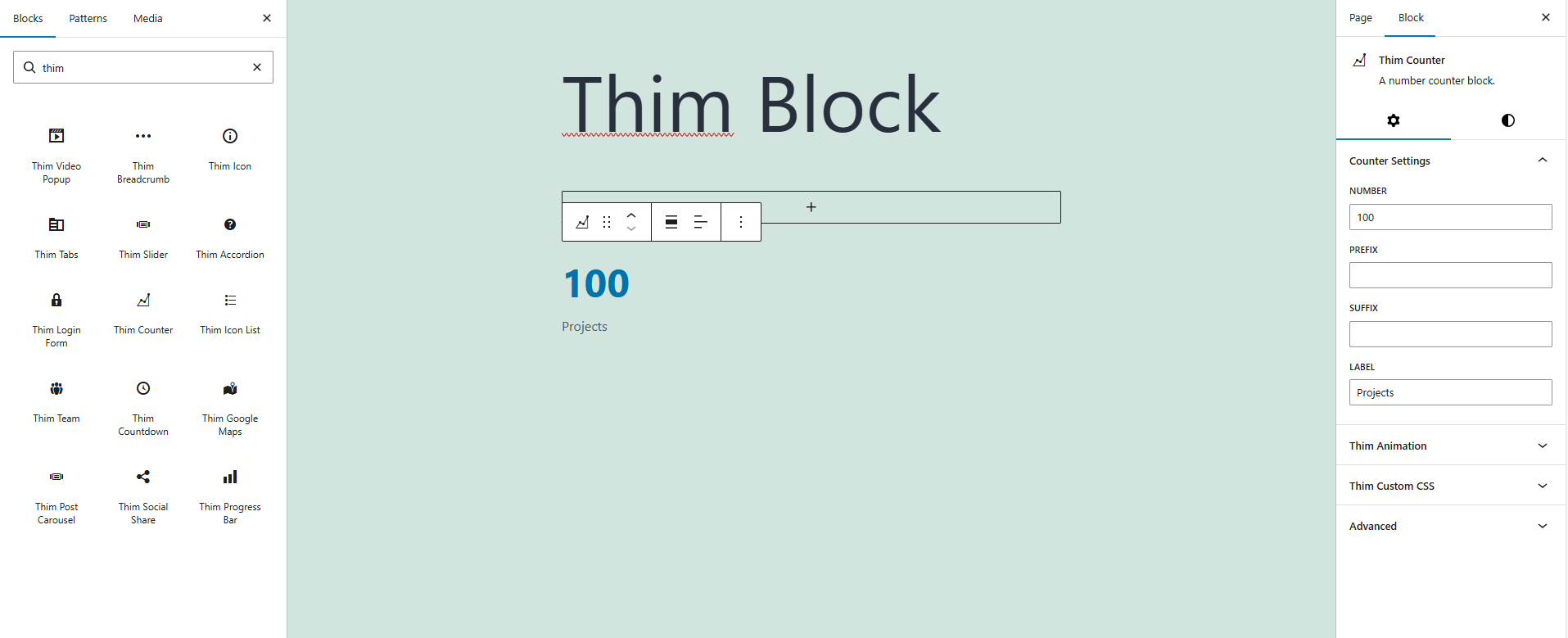
2. Counter Settings
2.1 Number
The main numeric value displayed in the counter.
-
Numbers only (e.g.
100,2500) -
This is the most prominent content of the block
2.2 Prefix
Text or symbol displayed before the number.
Examples:
-
$100 -
+100
2.3 Suffix
Text or symbol displayed after the number.
Examples:
-
100+ -
100%
2.4 Label
The descriptive text displayed below the number (e.g. Projects, Clients, Years of Experience).
3. Style Tab
3.1 Color
Set the background color for the entire counter block.
3.2 Dimensions
Inner spacing of the counter block.
-
Link or unlink sides
-
Useful when placing counters inside grids or sections
4. Number Styles
4.1 Font Size
Adjust the font size of the counter number.
-
Responsive support (Desktop / Tablet / Mobile)
-
Custom pixel values supported
4.2 Number Color
Set the color of the counter number.
5. Label Styles
5.1 Font Size
Adjust the font size of the label text.
-
Examples: Extra Small, Small, Default,…
5.2 Label Color
Set the text color of the label.
6. Thim Animation
Set the animation effect when the counter appears on the page.
-
None: No animation
-
Other animations (if available): Fade, Slide,…
7. Thim Custom CSS
Add custom CSS styles for the counter block.
8. Advanced
Advanced Gutenberg options:
-
Additional CSS Class(es)
-
HTML Anchor
-
Visibility (theme-dependent)